An Intel Arc Pro B70 can run a model while gdb-oneapi reports that kernel debug mode is disabled. GPU execution and GPU debugging need different support from the kernel and userspace driver. On this machine, enabling that support made it possible to stop inside a SYCL kernel, inspect a value of 7, and continue to its result of 12.
The same setup reaches a Python-launched Triton kernel. For PyTorch, a profile identifies repeated scalar transfers, and GDB locates the native call. For vLLM and SGLang, capturing a projection reduces a model request to a standalone operation. The device AddressSanitizer examples follow the B70 failures through the changes that made invalid accesses report correctly.
The downloadable lab contains the programs, container definitions, GDB scripts, pinned downloads, and recorded results. The final run passed 15 baseline, 23 extended and 34 sanitizer checks. An intentional failure counts as a passing check only when its expected error appears. GPU breakpoint checks also require an intelgt frame. The verification record and measurement summary preserve those distinctions.
Part I: Set up a GPU that GDB can attach to
Choose the device and download the lab
The tested host runs CachyOS on x86-64 and has four Arc Pro B70 cards. All lab work runs sequentially on one card. Its PCI address is 0000:0d:00.0. The GPU driving the desktop is a different device and keeps debugging disabled. Use the PCI address of an idle compute card on your own machine. Render-node numbers can change across boots.
You need Docker, Python 3.12 or newer, Git, curl and unzip on the host, access to /dev/dri, and administrator access for the kernel installation and per-device flag. The kernel build also needs the standard Arch build tools, Clang/LLVM, lld, bc, bison, flex, pahole and cpio. The tested compiler was Clang 23.1.3. Allow space for a kernel build, the container images, the SYCL toolchain and model weights. Setup downloads those dependencies separately.
Download and verify the source bundle before extracting it:
mkdir -p ~/Coding/xpu-debug-download
cd ~/Coding/xpu-debug-download
base=https://blog.rahul.onl/posts/xpu-debug-b70
curl -fLO "$base/xpu-debug-lab.zip"
curl -fLO "$base/xpu-debug-lab.zip.sha256"
sha256sum -c xpu-debug-lab.zip.sha256
unzip xpu-debug-lab.zip
cd xpu-debug-lab
sha256sum -c SHA256SUMS
export LAB_GPU_PCI=0000:0d:00.0
Run the remaining host commands from that extracted directory. The launchers mount it as /lab inside each container. The bundled AGENTS.md records the rules for changing examples and validating their results. docs/ contains longer command-by-command walkthroughs.
Enable the interface at each layer
GDB uses a Level Zero debug server to communicate with the compute runtime and the Xe driver. Each layer has a separate switch. The tested configuration is:
| Layer | Setting | Purpose |
|---|---|---|
| Linux kernel build | CONFIG_DRM_XE_EUDEBUG=y |
Builds the Xe EU-debug interface |
| Compute-runtime build | NEO_ENABLE_XE_EU_DEBUG_SUPPORT=1 |
Enables the userspace debugger support |
| Compute-runtime build | NEO_USE_XE_EU_DEBUG_EXP_UPSTREAM=1 |
Selects the interface used by this kernel branch |
| Selected GPU, after boot | enable_eudebug=1 in sysfs |
Allows debugger attachment to that device |
| Debugged process | ZET_ENABLE_PROGRAM_DEBUGGING=1 |
Enables program debugging for that process |
| Container | Selected card/render nodes, SYS_PTRACE, unconfined seccomp |
Exposes the device and permits debugger operations |
CONFIG_DRM_XE_EUDEBUG is a build option. enable_eudebug is a per-device sysfs control. Neither is a kernel command-line flag in this setup. Ordinary XPU inference does not require these debugging settings.
The three inspected paths stop at different places:
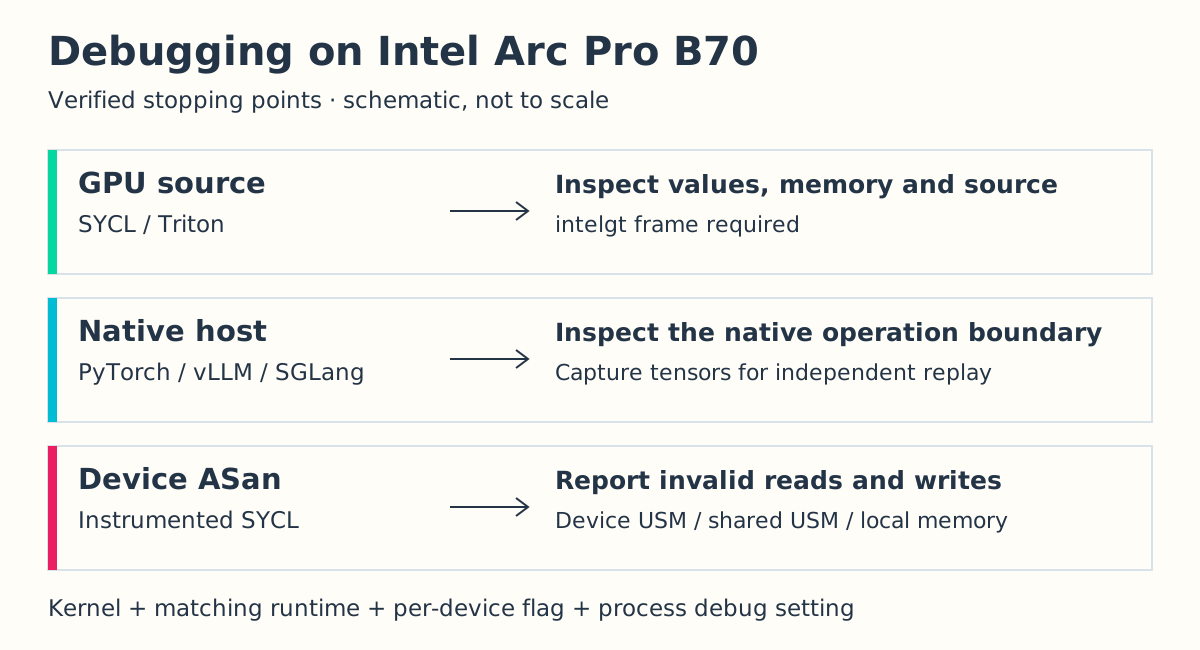
The host breakpoint remains useful when a library’s GPU symbols cannot be loaded. It can establish which arguments reached an operation before that operation is isolated for a smaller GPU test.
Build and boot the pinned Xe kernel
The lab uses Intel’s Xe EU-debug topic branch at commit 74e379ab00ff6cfd6f12730a893a745c5c4ca630. Fetch that revision:
mkdir -p work/kernel-eudebug
git -C work/kernel-eudebug init
git -C work/kernel-eudebug remote add origin \
  https://gitlab.freedesktop.org/miku/kernel.git
git -C work/kernel-eudebug fetch --depth=1 origin \
  74e379ab00ff6cfd6f12730a893a745c5c4ca630
git -C work/kernel-eudebug checkout --detach FETCH_HEAD
bash scripts/build_debug_kernel.sh
This is a CachyOS/Arch packaging path with machine-specific configuration checks. The script starts from /proc/config.gz, enables EU debugging, and builds separate linux-xe-eudebug and headers packages. Its checks preserve this host’s NVMe, Btrfs, encrypted-root, Ethernet, EFI and display-driver settings. Review those assertions for another machine. The resulting release candidate does not contain CachyOS’s scheduler patches.
On the tested host, install the two packages and check the boot files:
sudo pacman -U \
  work/kernel-build/linux-xe-eudebug-7.3.0rc1_xe_eudebug-1-x86_64.pkg.tar.zst \
  work/kernel-build/linux-xe-eudebug-headers-7.3.0rc1_xe_eudebug-1-x86_64.pkg.tar.zst
modinfo -k 7.3.0-rc1-xe-eudebug -F vermagic xe
The module release must match the installed kernel. Before rebooting, check that your bootloader has entries for both kernels and that the new entry uses your existing root-device and encryption settings. The bundle retains verify_debug_kernel_install.py as a worked example of this host’s checks. It requires pre-install Limine configuration and fallback-file hashes from the same machine, which are deliberately excluded from the download. Do not run it against the author’s recorded boot state. Reboot into the linux-xe-eudebug entry in Limine’s CachyOS menu, then return to the lab directory and check the selected device:
uname -r
export LAB_GPU_PCI=0000:0d:00.0
cat "/sys/bus/pci/devices/$LAB_GPU_PCI/device"
bash scripts/gpu_debug.sh status
bash scripts/gpu_debug.sh enable
The recorded release is 7.3.0-rc1-xe-eudebug, the B70 device ID is 0xe223, and the final flag is 1. Enabling the flag is a post-boot step. Keep the original boot entry available and enable only the compute GPU selected for the debugger session.
Build the matching userspace container
The container builds compute-runtime commit 9c39bf749c3db1a4e57c3ec4494c1dbb2371e21b with the two EU-debug options above and COMPILE_BUILT_INS=ON. The built-ins matter for sanitizer memory fills, as the ASan investigation below shows. Intel documents the debugger build options in its runtime build guide.
The dependency downloader verifies SHA-256 hashes before the build. Give the result both tags: the vLLM Dockerfile uses the shorter tag as its source for GDB files.
python3 scripts/prepare_runtime.py
docker build --build-arg BASE_IMAGE="$(cat container-image.txt)" \
  -f container/eudebug.Dockerfile \
  -t xpu-debug-eudebug:20261021-asan \
  -t xpu-debug-eudebug:20261021 work/eudebug-runtime
bash scripts/eudebug_container.sh start
bash scripts/eudebug_container.sh exec bash scripts/build.sh
bash scripts/eudebug_container.sh exec work/debug_capability
Require attach=1 before proceeding. The launcher exposes only the selected GPU’s card and render nodes, reserves 2 GiB of shared memory, and sets ZE_AFFINITY_MASK=0 with PCI ordering enabled. It refuses to replace an existing container of the same name. Use its status command for an existing installation.
The tested software versions are:
| Component | Tested version or revision |
|---|---|
| GDB | oneAPI 2026.1, GDB 17.1 |
| GmmLib / Level Zero loader / IGC | 22.10.2 / 1.34.0 / 2.41.5 |
| PyTorch / Intel Triton | 2.14.0.dev20260728+xpu / 3.7.2 |
| SGLang | 0.0.0.dev15740+g1eee8fbdc.d20260728 |
| vLLM | Official XPU image, 0.32.0 |
| Device ASan toolchain | Intel LLVM nightly-2026-10-21 |
The SGLang base image digest is in container-image.txt. The official vLLM image digest is in its Dockerfile. Runtime archives and checksums are in container/runtime-downloads.json. IGC 2.41.5 is the tested prebuilt release, which differs from the development commit in the runtime’s dependency manifest. These pins matter when reproducing debugger compatibility. Docker still obtains build tools from apt repositories, so byte-identical image rebuilds are not established.
Part II: Stop in SYCL and Triton kernels
Prove that the selected frame is on the GPU
The first SYCL program allocates a shared integer, writes 7 on the CPU, and adds 5 in a GPU task. The breakpoint lets GDB inspect both the value and the instruction:
bash scripts/eudebug_container.sh exec \
  gdb-oneapi -q -batch -x debugger/device.gdb --args work/device_probe
The saved transcript contains these lines, with setup messages omitted:
15        *value = *value + 5; // DEVICE_BREAKPOINT
LAB_GPU_BREAKPOINT_CONFIRMED architecture=intelgt
$1 = 7
device_result=12
device.gdb sets the program-debugging variable, breaks at the source line, prints *value, disassembles the current instruction, and continues. Its Python assertion checks gdb.selected_frame().architecture().name() for intelgt. A normal GDB exit or a host signal stop would not pass that check.
To inspect the probe interactively, start GDB with its executable:
docker exec -it xpu-debug-eudebug-test gdb-oneapi -q work/device_probeEnter these commands at the GDB prompt. print *value reads the shared integer at the stop, while next executes the source statement before continuation:
set breakpoint pending on
set environment ZET_ENABLE_PROGRAM_DEBUGGING 1
source debugger/visible_gpu_check.py
handle SIGSEGV nostop noprint pass
break examples/device_probe.cpp:15
run
python print(gdb.selected_frame().architecture().name())
print *value
x/i $pc
next
continue
quit
The architecture must be intelgt before interpreting the stop as GPU execution. The signal setting lets SYCL’s shared-memory page faults reach the runtime handler during this session.
The script also loads visible_gpu_check.py. The debugger helper in this image checks unexposed host GPUs and complains that their flags are disabled. The lab limits that preliminary check to the devices visible in the container. The actual GPU-frame assertion still has to pass. The desktop GPU keeps its debug flag disabled throughout these sessions.
Step through a bit reversal and inspect a wrong stride
The next program reverses the lowest eight bits of 16 integers. For input 1, the first loop iteration moves its low bit into the accumulator. Eight iterations produce 128. Run the saved stepping session:
bash scripts/eudebug_container.sh exec \
  gdb-oneapi -q -batch -x debugger/bitreverse.gdb \
  --args work/sycl_kernels bitreverse
GDB stops inside the GPU loop, prints index, value and reversed, executes next, and reads four input words with x/4uw data. The transcript shows 1 2 3 4 in memory and the accumulator changing from 0 to 1. All 16 final values match the CPU reference. This is source stepping in a GPU kernel, including a memory inspection at the stop.
The matrix example makes a different mistake: it reads a five-column matrix with a row stride of three. A row stride is the number of elements between the starts of neighboring rows. Using three selects the wrong elements even though the accesses in this small example remain inside the allocation.
bash scripts/eudebug_container.sh exec \
  gdb-oneapi -q -batch -x debugger/matmul.gdb \
  --args work/sycl_kernels matmul
bash scripts/eudebug_container.sh exec work/sycl_kernels matmul --fixed
At b[k * stride + col], GDB reports stride=3. The source requires 5. The bad run produces 18 mismatched output elements. The corrected run reports stride=5 expected_stride=5 mismatches=0. A memory sanitizer alone would not establish that the matrix arithmetic is correct. The CPU reference catches this indexing mistake.
Reach a Python-launched Triton kernel
The Triton input is a four-row matrix with eight numbers per row. Two program instances gather rows selected by [0, 7]. Row 7 does not exist. The kernel clamps the pointer and masks the invalid load, stores zeroes for that row, and writes an error flag. Python raises after synchronization:
bash scripts/eudebug_container.sh exec \
  python examples/03_triton_gather.py
bash scripts/eudebug_container.sh exec \
  python examples/03_triton_gather.py --print-indices
Both commands intentionally fail. The output includes INVALID_ROWS=[0, 1], identifying the second selection. The printed snapshot directory contains input tensors, output, metadata and compiler artifacts. --print-indices also runs tl.device_print. Exclude this diagnostic printing from timings.
Replace row 7 with row 3 and enter the kernel through GDB:
bash scripts/eudebug_container.sh exec gdb-oneapi -q -batch \
  -x debugger/triton-device.gdb \
  --args python examples/03_triton_gather.py --fixed
The recorded stop is in the Python source for gather_rows:
Thread 2.41 hit Breakpoint 1, with SIMD lanes [0-31], gather_rows ()
    at 03_triton_gather.py:23
23      tl.store(Invalid + row_slot, ~valid_row)
LAB_TRITON_GPU_BREAKPOINT_CONFIRMED architecture=intelgt
INVALID_ROWS=[0, 0]
PASS: Triton XPU gather matches CPU indexing
The script retains line information, forces recompilation, and disables IGC optimization for the debug compilation. The corrected second row contains 24 through 31 and matches CPU indexing exactly.
This adapts the investigation in Triton’s Blackwell TMA gather tutorial to Intel pointer loads. Blackwell’s TMA instruction and its illegal-instruction failure are hardware-specific. This example demonstrates a masked bad index and a real Intel GPU source stop. The Intel Triton debugging guide explains the backend’s debugging controls.
Part III: Repair device AddressSanitizer on B70
Trace the failure before changing the application
The original ASan probe was valid: it used the same shared integer and 7 + 5 kernel. Yet it aborted with exit 134 before producing 12. GDB traced the failure to zeVirtualMemReserve. The runtime requested 16 TiB of virtual shadow address space with a fixed hint of 0x100000000000000, and Level Zero returned 0x70000003, ZE_RESULT_ERROR_OUT_OF_DEVICE_MEMORY.
ASan shadow memory records whether application addresses may be accessed. That 16 TiB request describes virtual address space, not a request for 16 TiB of physical GPU memory. The fixed address hint was appropriate to the Ponte Vecchio (PVC) path and was also being used on this B70 path.
Intel’s PR #23514, merged on October 20, restricts the fixed shadow start to PVC and passes a zero hint elsewhere. PR #23450 also fixes the local-memory shadow stride for Battlemage (BMG) by making the host and device agree on 128 KiB. The lab uses the October 21 nightly containing both changes.
That solved the reservation failure, but two more failures remained in this stack:
| Observed failure | Change | Evidence after the change |
|---|---|---|
| Shadow reservation aborts before a valid kernel | Pinned Intel LLVM nightly with the address-hint and local-stride fixes | Setup proceeds past the reservation |
BuiltInKernelLibImpl::getFunction crashes during a memory fill |
Rebuild the lab’s custom compute runtime with COMPILE_BUILT_INS=ON |
Sanitizer setup can run its fill kernels |
| A corrected local-memory read intermittently hangs. The kernel logs a copy-engine fault | Set UR_L0_V2_FORCE_DISABLE_COPY_OFFLOAD=1 only for sanitizer processes |
Twenty fresh corrected local-read runs pass |
The missing built-ins were an error in the lab’s custom runtime build. The copy-offload setting is a workaround for an observed copy-engine failure. These tests do not establish its deeper driver cause. The final complete run recorded no new GPU faults. The bundle preserves the earlier errors as well as the final reports under evidence/asan-repair/.
Compile the test with device instrumentation
Download the pinned compiler, SYCL libraries and Unified Runtime together. The downloader verifies the upstream archive’s SHA-256 before extraction:
python3 scripts/prepare_sanitizer.py
bash scripts/eudebug_container.sh exec bash scripts/build_sanitizer.sh
bash scripts/eudebug_container.sh exec \
  bash scripts/sanitizer_env.sh work/asan/device_probe
The valid probe now prints device_result=12. The build script uses clang++ -fsycl -Xarch_device -fsanitize=address -g -O1. Its wrapper changes PATH and LD_LIBRARY_PATH for one command, selects the Level Zero GPU, enables local/private access detection, and disables copy offload. The inference containers retain their normal compiler and runtime environment.
examples/10_device_asan.cpp allocates 16 integers. Index 16 is one past the allocation. Index 15 is valid. Run an invalid write and its correction:
bash scripts/eudebug_container.sh exec bash scripts/sanitizer_env.sh \
  timeout --kill-after=5 60 work/asan/device_asan device write bad
bash scripts/eudebug_container.sh exec bash scripts/sanitizer_env.sh \
  timeout --kill-after=5 60 work/asan/device_asan device write fixed
Device unified shared memory (USM) is allocated for GPU access. Shared USM can be accessed by the host and device. The first command is expected to abort with exit 134. Its report identifies the memory type, access size, work-item and source line:
====ERROR: DeviceSanitizer: out-of-bounds-access on Device USM
WRITE of size 4 at kernel <typeinfo name for UsmAccess> LID(0, 0, 0) GID(0, 0, 0)
  #0 typeinfo name for UsmAccess /lab/examples/10_device_asan.cpp:48
The allocation address is omitted from this excerpt. The corrected command writes inside the allocation and reports PASS: result=123 expected=123. The full matrix covers reads and writes in device and shared unified shared memory (USM), plus local memory:
| Memory allocation | Invalid read / write | Corrected read | Corrected write |
|---|---|---|---|
| Device USM | Two ASan reports naming the source line, exit 134 | 15, exit 0 | 123, exit 0 |
| Shared USM | Two ASan reports naming the source line, exit 134 | 15, exit 0 | 123, exit 0 |
| Local memory | Two ASan reports naming the source line, exit 134 | 15, exit 0 | 123, exit 0 |
Run all 34 sanitizer checks with python3 scripts/validate_sanitizer.py --container xpu-debug-eudebug-test. They include the instrumented compilation, the valid probe, twelve access cases and twenty fresh corrected local-read runs. A separate build check confirmed rejection of missing device instrumentation. The compile-time guard prevents an uninstrumented binary from being mistaken for an ASan test.
These results cover the tested accesses on this pinned stack. Setting an environment variable does not add ASan instrumentation to precompiled PyTorch or inference-engine kernels. The lab’s separate initialization and single-writer examples are explicit program checks. They do not validate MemorySanitizer or ThreadSanitizer.
Part IV: Find a PyTorch synchronization bottleneck
Measure the operation before entering GDB
A tensor with 128 rows and 1,024 FP32 values per row is enough to show a common performance problem. Both functions below square and sum its values:
def scalar_loop(x):
    return sum(row.square().sum().item() for row in x)


def batched(x):
    return x.square().sum().item()
Each .item() makes a scalar available to Python on the CPU. The first version does that 128 times and dispatches separate row operations. The second performs one tensor reduction and one scalar extraction. Run the complete benchmark and reference check:
bash scripts/eudebug_container.sh exec \
  python examples/05_pytorch_performance.py
Both outputs agree with a double-precision CPU reference within relative error 1e-6. Each function runs three warmups followed by nine samples, with XPU synchronization around every measurement. The medians are 3.559 ms for the row loop and 0.058 ms for the batched reduction. The following plot shows every sample on the same axis:
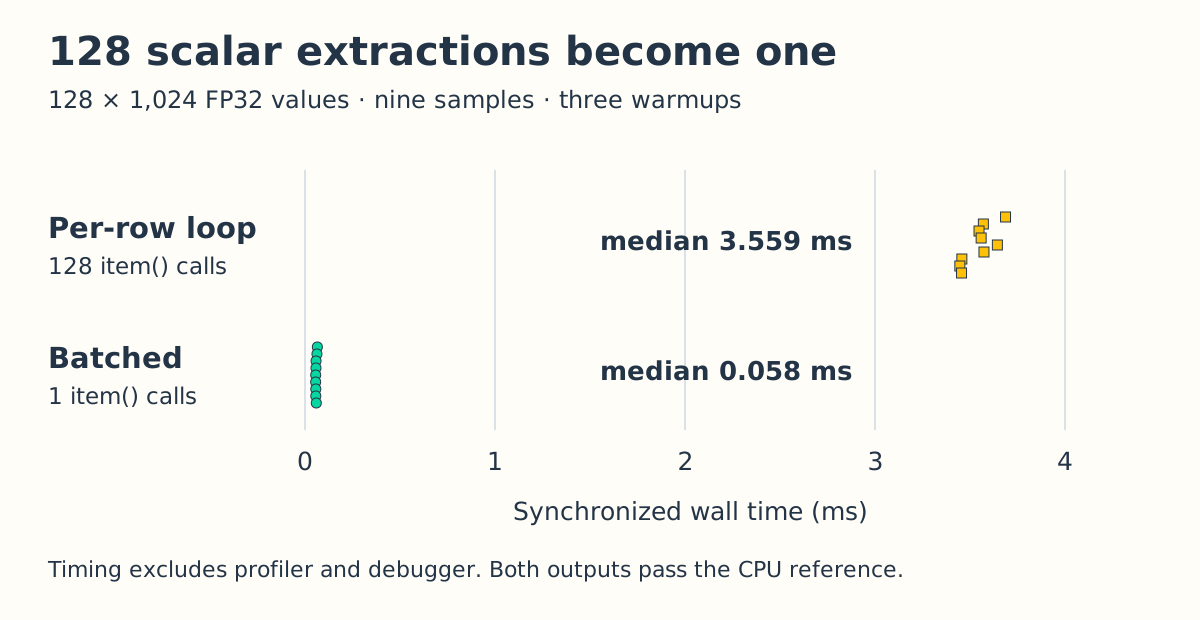
The benchmark records separate CPU/XPU profiles after timing. Those traces contain 128 aten::item calls for the loop and one for the batched version. The measured improvement includes both fewer dispatches and fewer scalar extractions. It applies to this small reduction exercise. Model inference needs its own workload and measurements.
Stop where .item() enters native XPU code
The GDB session catches libtorch_xpu loading and breaks in its scalar extraction function:
bash scripts/eudebug_container.sh exec \
  gdb-oneapi -q -batch -x debugger/pytorch.gdb \
  --args python examples/05_pytorch_performance.py --debug
The transcript reaches at::native::_local_scalar_dense_xpu and prints the native stack. This connects the Python operation to the host-side library function. GDB pauses execution, so its elapsed time is unsuitable for the performance comparison. Use the unprofiled measurements for latency, the profiler for scheduling and kernel activity, and the breakpoint for control flow and arguments.
GPU attachment to a precompiled PyTorch reduction also exposed a debugger symbol-loading error, sect_index_text not initialized. The Triton example avoids that unrelated reduction and reaches its GPU source breakpoint. The results here establish native PyTorch inspection and source debugging of the lab’s own kernels, with that library-symbol limitation still present.
Part V: Capture and replay a real inference operation
Start both engines with the same small model
Qwen3-0.6B is a dense transformer language model used here for short, bounded debugger sessions. Both engines load its BF16 checkpoint at revision c1899de289a04d12100db370d81485cdf75e47ca, with one GPU, tensor parallel size one, concurrency one, eager execution and a 1,024-token context limit.
Download the checkpoint, build vLLM’s debugger layer, and start its container:
bash scripts/eudebug_container.sh exec python scripts/fetch_model.py
docker build -t xpu-debug-vllm:20261021 \
  -f container/vllm-debug.Dockerfile container
bash scripts/vllm_container.sh start
The vLLM image keeps its original GPU runtime. The additional layer supplies GDB for native worker inspection. The separate EU-debug image provides SGLang and the small GPU reproducers. Run the engines sequentially:
bash scripts/eudebug_container.sh exec \
  python examples/06_engine_inference.py sglang --profile
bash scripts/vllm_container.sh exec \
  python examples/06_engine_inference.py vllm --profile
The SGLang script selects intel_xpu attention, disables the base image’s experimental INT8/GEMV overrides, and sets disable_cuda_graph=True, the installed API’s name for this switch even on XPU. vLLM uses enforce_eager=True. Both reserve a memory fraction of 0.25.
Each measured request has the five-token prompt The capital of France is and generates exactly 16 tokens, with temperature zero and EOS stopping disabled. One warmup precedes three measured requests. An additional request records the profile:
| Engine | Completed measured requests | Median full-request time | GPU kernel events in the separate profiled request |
|---|---|---|---|
| SGLang | 3 / 3 | 242.545 ms | 6,238 |
| vLLM | 3 / 3 | 161.114 ms | 5,897 |
These are eager debugging configurations and only three samples per engine. The intervals include prefill, decode and engine overhead. They do not measure cached-decode tokens per second or establish an engine ranking. The saved SGLang response begins Paris. The capital of France is also the capital of the Republic of France. The vLLM response begins Paris. The capital of France is also the capital of the French Republic. The. This checks basic execution and token counts, without a model-quality claim.
Attach to the model worker and save a projection
An API frontend can be a different process from the worker executing a model. The capture hook records the worker’s PID next to its input tensors. The host script attaches to that PID, lets the waiting worker continue after attachment:
set -o pipefail
python3 scripts/capture_engine.py sglang \
  --container xpu-debug-eudebug-test | tee evidence/postboot/sglang-worker-capture.log
python3 scripts/capture_engine.py vllm \
  --container xpu-debug-vllm | tee evidence/postboot/vllm-worker-capture.log
Each invocation creates and prints a fresh capture directory. Setting LAB_CAPTURE_DIR installs the callbacks for a capture run. CPU copies of the input, weight and bias are saved before the call, and the output is saved afterward. Metadata records shape, stride, dtype, device and process ID.
Both captured operations are query, key and value (QKV) projections, which prepare the token features used by attention. Five tokens enter the layer, with 1,024 numerical features per token. A weight matrix maps each token to 4,096 output features. In tensor notation, the input is (5, 1024), the weight is (4096, 1024), and the operation is input @ weight.T, plus bias when present. Both captures use contiguous BF16 tensors.
The worker stops at the lab’s native inspect_contract function immediately before the projection. The relevant output is:
LAB_ENGINE_WORKER_NATIVE_BREAKPOINT
observed = 1024
expected = 1024
Those arguments compare the input width with the weight’s input width. This is a native host breakpoint in the actual model worker at an explicitly instrumented boundary. It does not step through the GPU matrix multiplication. The saved operation provides the next, smaller reproducer.
The pinned SGLang build also needed orderly worker teardown. Its default Engine.shutdown() immediately kills children. An earlier capture completed but logged a copy-engine page fault during shutdown. The helper sends the scheduler’s existing ShutdownReq, requires exit zero within 30 seconds, and then cleans up other children. This uses private APIs from the pinned image, so it needs rechecking when that image changes. Shutdown occurs after the measured requests.
Replay the saved arguments and inspect a deliberate width error
The capture directories contain the data needed to run the linear operation without loading the whole model. The validator reads the capture paths from the two logs saved above and checks both ordinary replay and an intentionally bad input:
python3 scripts/validate_extended.py --container xpu-debug-eudebug-testIn the recorded run, both engine captures replayed with exactly the saved output, with maximum difference zero. They also passed an independent FP32 CPU calculation with BF16 tolerance. The bad replay removes one input column, changing its width from 1,024 to 1,023 while leaving the saved tensors untouched. The host breakpoint then shows:
ValueError: linear input width 1023 != weight width 1024
LAB_NATIVE_HOST_BREAKPOINT
observed = 1023
expected = 1024
The exception and breakpoint lines are excerpts from the ordinary and GDB runs respectively. docs/06-INFERENCE.md shows how to replay one selected capture directly. Preserve the full arguments and layouts when reducing a real failure. A tensor with the same shape but different strides can exercise a different kernel path.
Apply the same capture workflow to embeddings and attention
SGLang’s crash-debugging skill uses input logging to recover failing operations. The lab’s embedding example uses the installed debug_kernel_api decorator. It saves inputs for a four-row table before checking a request for row 7:
bash scripts/eudebug_container.sh exec \
  python examples/01_sglang_embedding.py
bash scripts/eudebug_container.sh exec \
  gdb-oneapi -q -batch -x debugger/host.gdb \
  --args python examples/01_sglang_embedding.py
bash scripts/eudebug_container.sh exec \
  python examples/01_sglang_embedding.py --fixed
The failure is embedding index 7 exceeds last row 3. At the native boundary, case_id=1, observed=7 and expected=3 identify the bad argument. The check raises before an invalid GPU access. Replacing 7 with 3 executes the XPU embedding and matches CPU indexing. Its new snapshot includes the output. The failed snapshot retains the inputs and exception.
The attention example follows the API-capture approach from FlashInfer’s debugging skill, using PyTorch XPU scaled dot-product attention and a local logger. FlashInfer itself is not running on Intel here. The failing query has 32 features per head, while the key has 16:
bash scripts/eudebug_container.sh exec \
  python examples/02_attention_contract.py
bash scripts/eudebug_container.sh exec \
  gdb-oneapi -q -batch -x debugger/host.gdb \
  --args python examples/02_attention_contract.py
bash scripts/eudebug_container.sh exec \
  python examples/02_attention_contract.py --fixed
The snapshot reproduces query head dimension 32 != key head dimension 16. The host stop reports case_id=2, observed=16, expected=32. With matching widths, the XPU result agrees with the CPU attention equation: query-key multiplication, scaling, softmax, then multiplication by the value matrix. The comparison uses relative tolerance 1e-4 and absolute tolerance 1e-5.
Part VI: Reproduce the checks and extend one example
Run the complete sequence and inspect its records
After the kernel, two containers, sanitizer toolchain and model are prepared, run the seven stages in order:
python3 scripts/inspect_setup.py > evidence/postboot/setup.json
python3 scripts/run_all.py
python3 scripts/report_results.py
The runner performs the 15 baseline checks, 34 sanitizer checks, inference and live capture for each engine, then 23 extended checks. It stops on an unexpected exit. The report reads their artifacts and records the exact source hashes alongside the measurements. evidence/postboot/run-all.json records all seven completed stages in the published run.
The extended checks also include a two-rank MPI example: each rank runs a local SYCL kernel, producing 2 and 4, and both receive an all-reduced total of 6. GDB stops rank zero at its native host contract. The original 64 MiB container shared-memory allocation caused a bus error. The launchers use 2 GiB. This is a command-line rank-debugging exercise. The recorded sessions cover the command line and leave VS Code GUI interaction untested.
The bundle includes the raw GDB transcripts, timing samples, selected profiler traces and final reports. Large third-party toolchains, model weights, kernel sources and build products are fetched or generated by the setup commands. The recorded evidence describes the original run. Rerunning the scripts replaces the corresponding output files with your own results.
Use the smallest reproducer that still shows the problem
Start with device_probe and require the GPU-frame marker before debugging a larger application. For a wrong answer, preserve inputs and compare against a reference. For a memory error, compile the reduced kernel with device ASan. For latency, collect unprofiled synchronized timings and a separate trace, then use GDB to inspect the relevant call path.
The lab bundle keeps these steps editable. A useful next exercise is to change the matrix stride bug while keeping all accesses in bounds, then compare the reference failure with an ASan run. That distinguishes an incorrect calculation from an invalid access using the same program. When finished, detach the debuggers and disable the selected GPU’s interface with bash scripts/gpu_debug.sh disable. The original CachyOS boot entry remains available for returning to the regular kernel.